
Your phone can now do much more than translate a word or sentence.
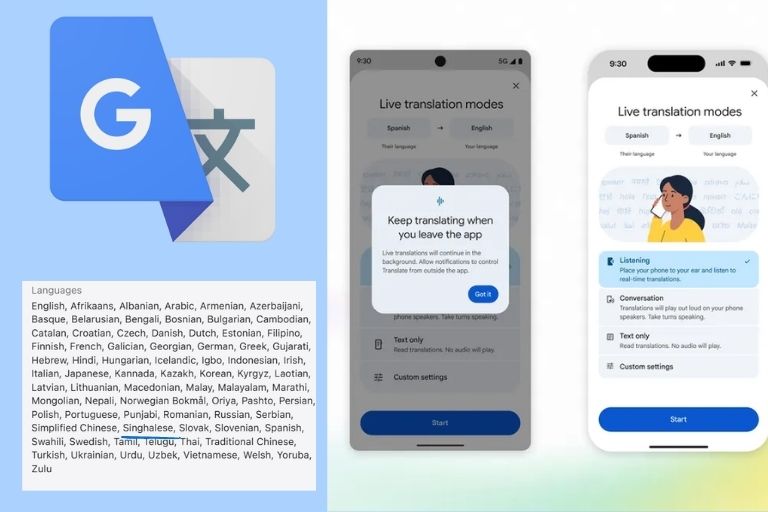
Google has upgraded Live Translate in its Google Translate app to handle near-real-time conversations in more than 70 languages, including Sinhala and Tamil.
The feature works on both Android and iOS. It can translate conversations as people speak, play the translation aloud, and show the conversation as text on screen.
That means users can follow a conversation through both sound and text instead of stopping after every sentence to type a translation.
Sinhala is among the supported languages
For Sri Lankan users, one of the notable details is the inclusion of Sinhala and Tamil in Live Translate.
Google’s current support list includes both languages alongside English, Hindi, Arabic, French, Korean, Spanish and many others.
The system can automatically detect the language being spoken and switch between speakers during a conversation.
Google says its Gemini-powered speech technology is designed to recognise accents, intonation and pauses. It can also handle background noise, which could help in places such as airports, cafés and public transport.
The latest Gemini 3.5 Live Translate model generates speech continuously rather than waiting for every sentence to finish. Google says translations can stay only a few seconds behind the speaker.
That makes the feature more suitable for an actual conversation.
Your phone can translate while you listen
Google has also added features aimed at making Live Translate easier to use in real situations.
On Android, Live Translate can now continue running in the background. Users can lock the screen or work on another task while the translation continues. Google says support for this feature on iOS is coming soon.
On iOS, users can now hear translated audio through the phone’s earpiece. This can be useful when listening to announcements or conversations in noisy places without using headphones.
Live Translate can be used with or without headphones on supported devices. Users can choose listening, conversation, or text-only modes.
How to use Google Live Translate?
Open the Google Translate app on your Android or iPhone.
Tap Live Translate, choose the languages, and start speaking.
The app can detect the active language and provide the translation through audio and on-screen text.
Google has also added personalised language practice. The feature can create speaking and listening exercises based on a user’s goals and skill level.
For Sri Lankan travellers, students and professionals, the bigger change is simple.
Instead of using Google Translate only when a language becomes a barrier, the app is moving closer to becoming a real-time interpreter in your pocket.
Link to the Google Translate App
More:
The World Map You Grew Up With Makes Africa Look Much Smaller Than It Really Is
Last modified: September 6, 2026